

Dentists often ask us what their own team can do to help the marketing. Our answer is almost always the same: get more Google reviews. It is one of the few levers fully inside the practice, and knowing how to ask patients for Google reviews the right way is the difference between a trickle and a steady stream.
This guide is about the ask itself: who on your team asks, when, what they say, where your review link lives, and how to put it on autopilot without breaking Google, FTC or HIPAA rules. We walked through the full routine in the training below.
If you first want the case for why reviews drive Google rankings, patient trust and AI answers, start with our answers to the 26 questions dentists ask about Google reviews. Here we stay focused on the ask.
Video chapters (20)
- 0:00Welcome
- 0:59Meet Sonia Hounsell
- 3:36Why reviews matter: patients, Google and AI
- 4:58How Google ranks your practice
- 6:52The trust bar is rising
- 7:58Patients now ask AI who to trust
- 9:51The review flywheel and your culture
- 12:23Google, FTC and HIPAA review rules
- 14:36Who asks: reviews are a team sport
- 16:31When to ask for a review
- 17:31How to ask naturally
- 18:26Make your review link easy to find
- 20:08Steady reviews beat a big burst
- 21:44How to get detailed reviews
- 22:27Automate the ask
- 23:23Reply to every review, HIPAA safe
- 24:19How to answer a negative review
- 24:57Track your review metrics
- 26:235 things to do tomorrow
- 28:15Free review reports
Key takeaways
- Make reviews a team sport: the dentist plants the seed, the hygienist spots the moment, the front desk confirms the mobile number.
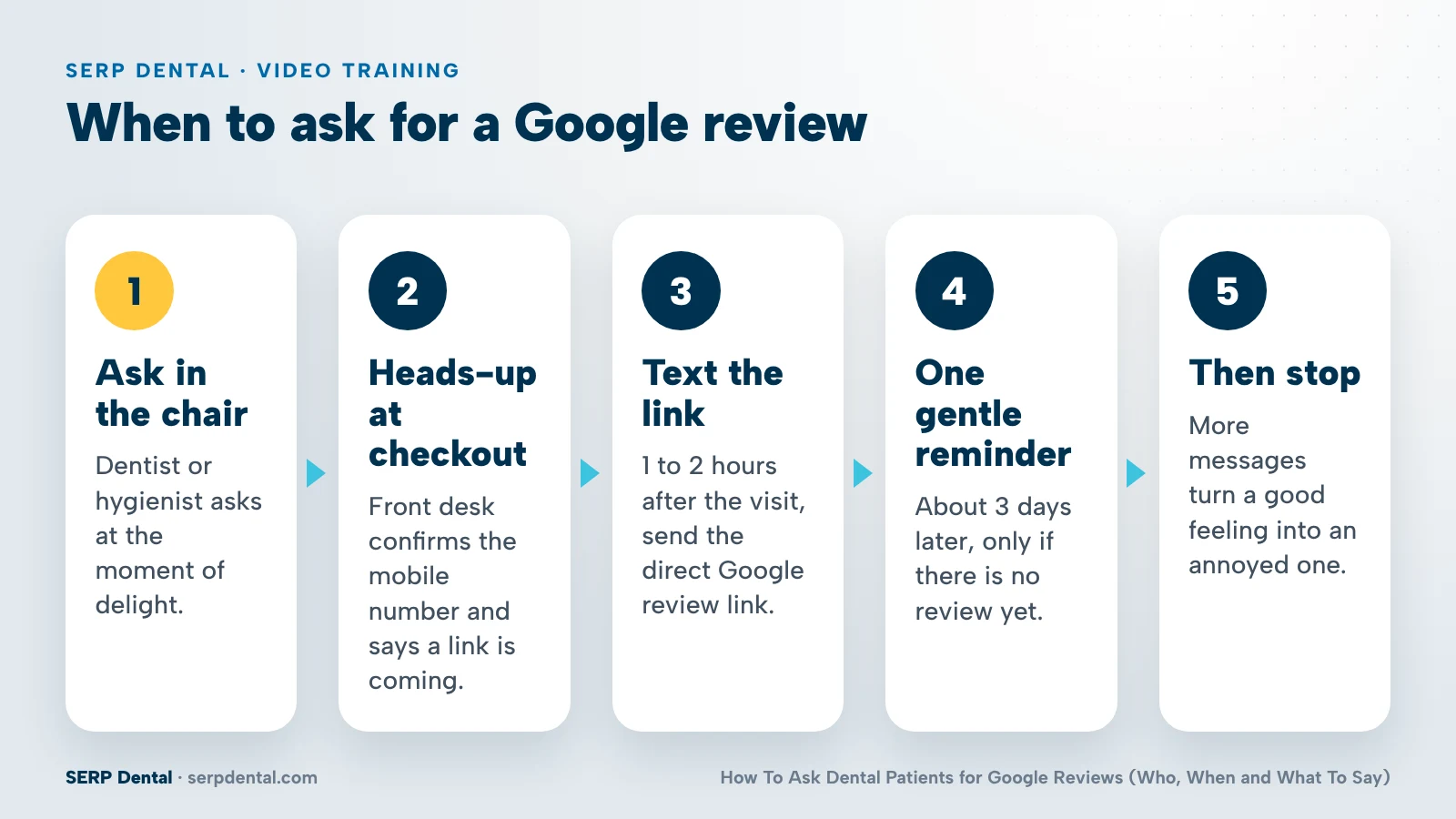
- Ask in the chair, text the review link 1 to 2 hours later, send one reminder about 3 days later, then stop.
- Say it helps other patients, tell them the link is coming, ask everyone, and never ask for 5 stars.
- Aim for a steady 4 to 5 reviews a month and never go more than 2 weeks without a new one.
- New this year: no staff review quotas and no asking patients to name staff. The doctor's name can still appear.
Who on your dental team should ask patients for reviews?
The whole team, with one person in charge. The dentist plants the seed, the hygienist or assistant spots the moment, the front desk confirms the mobile number and mentions the text, and a review champion tracks new reviews every week and celebrates them with the team.
We think of reviews as a team sport. When one person carries the whole job, it fades in the first busy week. When everyone has a part, asking becomes a habit.
| Role | Their job | What it sounds like |
|---|---|---|
| Dentist | Plants the seed | "I'm really happy with how this turned out." |
| Hygienist or assistant | Spots the moment of delight | "I'm glad your mouth is feeling so fresh." |
| Front desk | Closes the loop | "Is this still your mobile number? We'll text you a link." |
| Review champion | Owns the result | Shares new reviews at the morning huddle |
Why the dentist goes first
If your doctor asks you to do something, you are more likely to do it. A short, genuine ask from the dentist carries more weight than any sign or text.
Why the hygienist spots the moment
Hygienists and assistants see the patient's reaction up close. When a patient says their mouth feels great, that is the moment to mention a review and to say it helps other patients.
Why the front desk matters more than you think
The text only works if it reaches the right phone. The front desk confirms the mobile number, gives a heads-up that a link is coming and points to the QR code at checkout.
Name a review champion
Every team sport needs a captain. Your review champion tracks new reviews each week, shares them at a team meeting and celebrates the great feedback. That keeps reviews part of your culture, not a one-time push. Watch the team roles at 14:36.
When is the best time to ask a patient for a Google review?
Ask in the chair at the moment of delight, give a heads-up at checkout, then text the direct review link 1 to 2 hours after the visit. If there is no review after about 3 days, send one gentle reminder. Then stop, so the patient never feels chased.
| When | What happens | Who |
|---|---|---|
| In the chair | A verbal ask when the patient is happy | Dentist, hygienist or assistant |
| At checkout | Heads-up that a text is coming, confirm the mobile number, point to the QR code | Front desk |
| 1 to 2 hours later | Text with the direct Google review link (the sweet spot) | Your patient communication platform |
| About 3 days later | One gentle reminder, only if there is no review yet | Automated |
| After that | Stop | Nobody |
The data we shared in the training shows 94% of consumers are open to writing a review if you catch them at the right moment. These touchpoints are those moments.
Why 1 to 2 hours? The experience is still fresh, and the patient was told at checkout to expect the text. Why only one reminder? More texts and messages turn a good feeling into an annoyed one. See the timing slide at 16:31.
How to ask patients for Google reviews: what should you say?
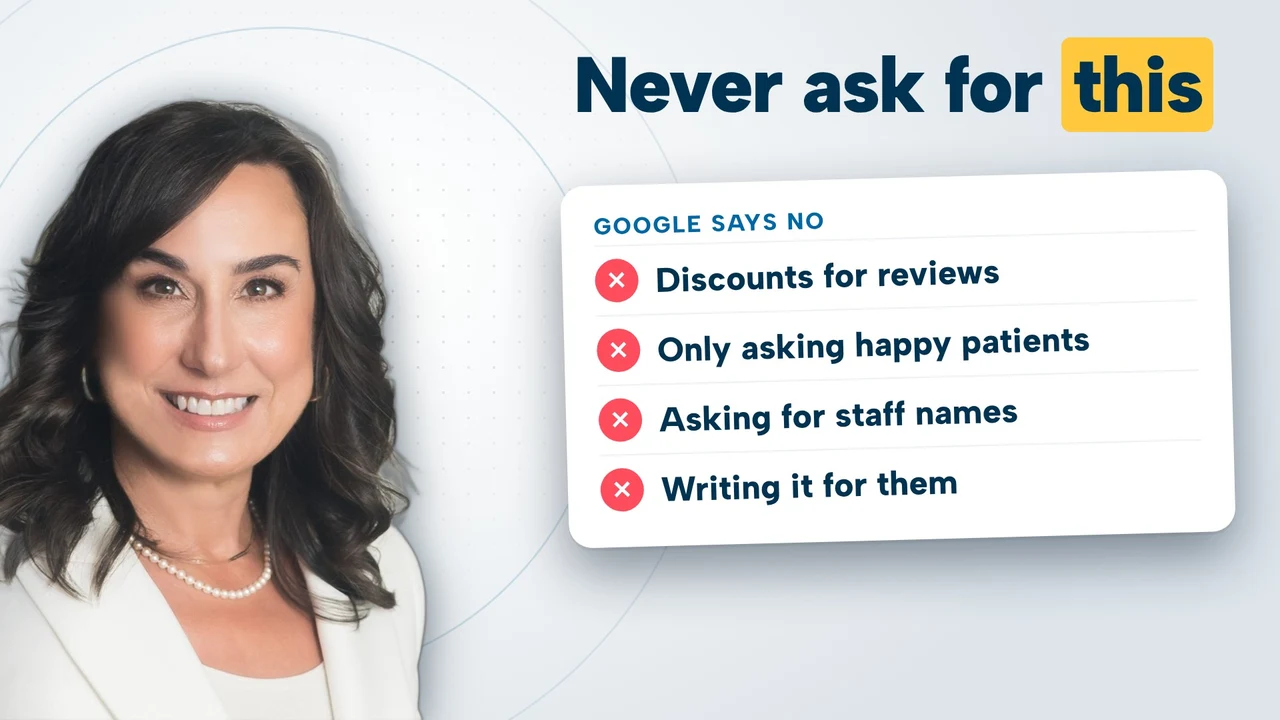
Warm up first with "How did everything go?", then ask sincerely when the moment feels natural. Tell the patient a review helps other patients, let them know the link is coming by text, and ask everyone the same way. Never ask for 5 stars and never offer a discount.
Scripts your team can use
Dentist: "I'm really happy with how this turned out. If you have a minute later, a Google review would mean a lot to our team. It helps people in town find a dentist they can trust."
Hygienist or assistant: "I'm glad your mouth is feeling so good. We'd love it if you left us a review. It really helps other patients."
Front desk: "You'll get a text from us with a link to leave a Google review. Is this still the best mobile number for you?"
Don't read these word for word. Use them as a starting point and let each person say it in their own voice.
The five rules of a good ask
- Make it sincere. Patients can tell a script from a real request.
- Say it helps other patients. People like to be helpful.
- Tell them the link is coming. A text they expect is a text they open.
- Never ask for 5 stars. Ask for honest feedback.
- Ask everyone. Not only the patients you think are happy.
How to get richer reviews without scripting them
Detailed reviews tell Google, AI and future patients what you are known for. Ask for honest feedback in the patient's own words, and deliver care worth describing in detail.
Do not suggest services or keywords to include. If a patient mentions implants or Invisalign on their own, great. Never ask a patient to mention a team member by name, and never write or post a review on anyone's behalf.
What rules apply when you ask patients for reviews?
Google bans discounts or rewards for reviews, review gating and reviews from family or staff. New this year, it also says not to set staff review quotas or ask patients to name staff. The FTC bans fake and AI-written reviews, incentives and hiding negatives. HIPAA governs every reply.
This is general education, not legal advice. These rules shape how Google treats your reviews, and the FTC rules carry penalties.
| Source | Do not | You can |
|---|---|---|
| Google policy | Offer discounts or rewards for reviews. Gate reviews (only ask happy patients). Collect reviews from family or staff. | Ask every patient the same way. |
| Google, new this year | Set review quotas for staff. Ask patients to name staff members. | Let the doctor's name appear when the patient includes it. |
| FTC rule | Post fake reviews. Use AI to write reviews. Offer incentives. Suppress or hide negative reviews. | Encourage honest reviews from real patients. |
| HIPAA | Confirm someone is a patient in a reply. Mention treatment details, even if the patient did. | Keep replies general and train everyone who replies. |
The staff name change matters if you built your routine around older advice. Google used to reward staff names in reviews. Now you should not ask for them. The doctor's name can still show up when a patient chooses to include it.
Replying is its own skill. For HIPAA-safe reply wording and how to handle a negative review, see our dental practice Google reviews FAQ.
Where should your Google review link and QR code live?
Everywhere a patient might see it. Get the short review link and QR code from your Google Business Profile, test it on your phone, then put it at checkout, in the review text, in the follow-up email, on your website, in staff email signatures and in your social media bios.
Get your link in about five minutes
- Sign in to your Google Business Profile and search your practice name while logged in.
- Click "Ask for reviews" (sometimes "Get more reviews").
- Copy the short link and download the QR code.
- Test the link on your phone before you share it.
- Make sure every team member has it.
If you get stuck, your agency or support team can pull it for you.
Put it in every place patients look
| Placement | Why it works |
|---|---|
| Checkout desk (QR code sign) | Patients can scan it before they leave |
| Same-day text | Your main ask, with the link one tap away |
| Follow-up email | A second channel for the reminder |
| Your website | Patients already go there |
| Staff email signatures | Every email becomes a quiet ask |
| Social media bios | Followers see it when they check your profile |
Refresh your QR code sign
If the same sign has sat on your front desk for years, patients stop seeing it. A fresh one takes about 10 minutes. The video shows a sign generator that builds a sign from your own QR code and lets you match your practice colors.
Why does a steady flow of reviews beat a big burst?
Google, AI and patients all reward recency. A steady drumbeat of 4 to 5 new reviews every month is worth more than a big burst in one month followed by silence. Set a simple goal: never go more than 2 weeks without a new review.
The math adds up faster than most owners expect. If you see 20 patients a day and only 10% leave a review, that is about 40 new reviews a month.
Recency matters to patients too. In the data we shared, 75% of people discount reviews that are 3 months old or older.
| One practice | Another practice | |
|---|---|---|
| Total reviews | 312 | 148 |
| Most recent review | 7 months ago | 2 days ago |
| What a patient sees | A practice that may have gone quiet | A practice that is active right now |
A patient comparing these two will often lean toward the practice with the recent review, even though it has fewer in total. See the comparison at 20:08.
Fresh, consistent reviews also tell AI tools that you are active. For how AI engines read your reviews and the rest of your online presence, see our guide to answer engine optimization for dentists.
How do you automate review requests from your practice management system?
Connect your practice management system to your patient communication or review platform. When a visit is marked complete, the review text goes out 1 to 2 hours later, an email follows about 3 days later if there is no review, and your team gets an alert when a new review lands.
- Connect your tools. Link your practice management system to the patient communication tools you already use. Your agency or support team can help.
- Trigger on visit complete. That status change starts the sequence on its own.
- Text 1 to 2 hours later. The direct review link, nothing else.
- Email 3 days later. Only if the patient has not left a review.
- Alert the champion. When a review comes in, your review champion sees it, tracks it and celebrates it with the team.
Once it is set up, nobody has to remember. Every completed visit gets the ask, which also keeps you honest on the ask everyone rule. Watch the automation walkthrough at 22:27.
Keep patient data where it belongs: the connection should run between your own systems. If you ever use an AI tool to check your request wording or results, use de-identified exports and never paste patient names or health details into a public AI tool.
Track a few numbers
Tracking keeps the team focused and makes reviews part of your rhythm. Each month, look at total reviews, new reviews, average rating and response rate. Watch what your competitors are getting, and read for themes: celebrate the praise, and fix what patients complain about. Our AscendView platform tracks what is being said about your practice in AI answers, including review themes, and recommends what to fix.
5 things to do tomorrow
Start with the link and a person. Grab your Google review link, name a review champion, turn on same-day review texts, put a fresh QR code at checkout and reply to your last 10 reviews. Most of this takes minutes, and the routine builds from there.
- Grab your Google review link (5 minutes). Get it from your Google Business Profile, test it and make sure every team member has it.
- Name your review champion. One person who watches for new reviews and shares great feedback at the morning huddle.
- Turn on same-day review texts. This takes a little longer because it means connecting tools and updating settings, but the settings already exist, and then it runs on its own.
- Put a QR code at checkout (about 10 minutes). Already have one? Refresh it so patients notice it again.
- Reply to your last 10 reviews (about 20 minutes). Thank the reviewer, reinforce what they said without names or treatment details, and sign off. Keep it HIPAA safe.
Want to know where your reviews stand against local competitors? Book a free strategy session and we will bring a ranking report, an SEO visibility scan and an AI visibility analysis from our AscendView platform.
Frequently asked questions
Do Facebook and Yelp reviews matter, or only Google reviews?
They matter, because AI tools pull from everything they can find about your practice online. But Google reviews come first by a wide margin, since they feed the algorithm that drives your Google ranking. Put most of your effort into Google, and treat reviews on other sites as a bonus rather than a replacement.
How should we reply to a negative review if we don't think the person was ever a patient?
Do not confirm or deny that the person is a patient, even to say they are not. Keep the public reply short and general, for example: please call our practice if you have a question. That takes the conversation offline so you can address the issue privately and stay HIPAA safe.
Can we ask patients to mention a treatment like implants or Invisalign in their review?
No. Ask for honest feedback in the patient's own words and do not suggest services or keywords. If a patient mentions a treatment on their own, that is great, and it helps Google and AI understand what you are known for. Just never script the review or write it for them.
Can we ask patients to name our hygienist or front desk team in a review?
Not anymore. Google used to reward staff names in reviews, but that changed this year: practices should not ask patients to name staff or set review quotas for staff. The doctor's name can still show up when a patient includes it. Keep the ask simple and let patients use their own words.
Do we still need a QR code sign if we already text the review link?
Yes. The text is your main ask, but a QR code at checkout catches patients in the moment, before they leave. If your sign has been on the desk for years, refresh it. Patients stop noticing a sign they have seen many times, and a new one takes about 10 minutes.
Keep watching


Sonia Hounsell is Co-CEO of SERP Dental, a division of AscendPoint Agency. A brand marketer classically trained in healthcare at companies like Pfizer and Bayer, she launched an oral care product, took it to Shark Tank, and later sold the company.